Alternative to Google Tuner: A More Accurate Online Tuner for Every Instrument


If you have ever grabbed your guitar or ukulele before a practice session and typed "google tuner" into the search bar, you already know why Google’s built-in tuner became so popular. It appears right at the top of the page, requires no download, and gives you a quick chromatic needle in a couple of seconds. When you only need to check whether a single string has slipped slightly flat overnight, that tiny widget gets the job done.
Spend more than a few minutes relying on it, however, and the cracks appear quickly. Google built a minimal search-results widget, not a dedicated instrument tuner. The moment you step into a room with background noise, switch to an alternate tuning, calibrate to 442 Hz for a rehearsal, or open Safari on an iPhone, you start fighting the tool instead of playing music. That is where a dedicated, free alternative to Google Tuner like OnlineTuner.org changes the experience completely.
What Google’s Built-In Tuner Does Well — and Where It Falls Short
To be fair, Google’s widget gets one thing right: speed. Because it runs as a bare chromatic meter, it listens through your default microphone and tells you the closest semitone it hears. For experienced players who already know every note name, octave number, and target frequency on their instrument by heart, a plain chromatic readout is sometimes all that is required.
The problem is that real-world tuning rarely happens in a silent studio at standard concert pitch. Acoustic instruments ring with rich overtones, low bass and cello strings produce heavy fundamental vibrations that confuse lightweight web detectors, and everyday rooms are full of air-conditioning hum, distant traffic, or bandmates warming up nearby. Google’s tuner offers no noise gate, no sensitivity control, and no way to pick a specific microphone when you have an audio interface or USB mic plugged in. If the needle starts jumping wildly between two notes, you have no dial to calm it down.
Just as frustrating is what is missing for everyday musicianship. Google’s widget is permanently locked to A4 = 440 Hz, so orchestral string players tuning to 442 Hz or 444 Hz—and acoustic guitarists experimenting with 432 Hz—hit an immediate dead end. There are no audio reference notes to listen to, no string diagrams for beginners, and zero presets for Drop D, DADGAD, Open G, or baritone ukulele. You are left staring at a blank semicircular meter and doing all the mental translation yourself.
Inside a Dedicated Browser Tuner Built for Real Practice
Opening OnlineTuner.org feels different the second the page loads because every control on screen exists to solve a real tuning headache. Alongside the large, high-contrast pitch dial, the right-hand settings panel lets you choose exactly which microphone or audio interface the browser should listen to—crucial if your laptop keeps defaulting to its built-in webcam mic while your instrument is plugged into an interface.
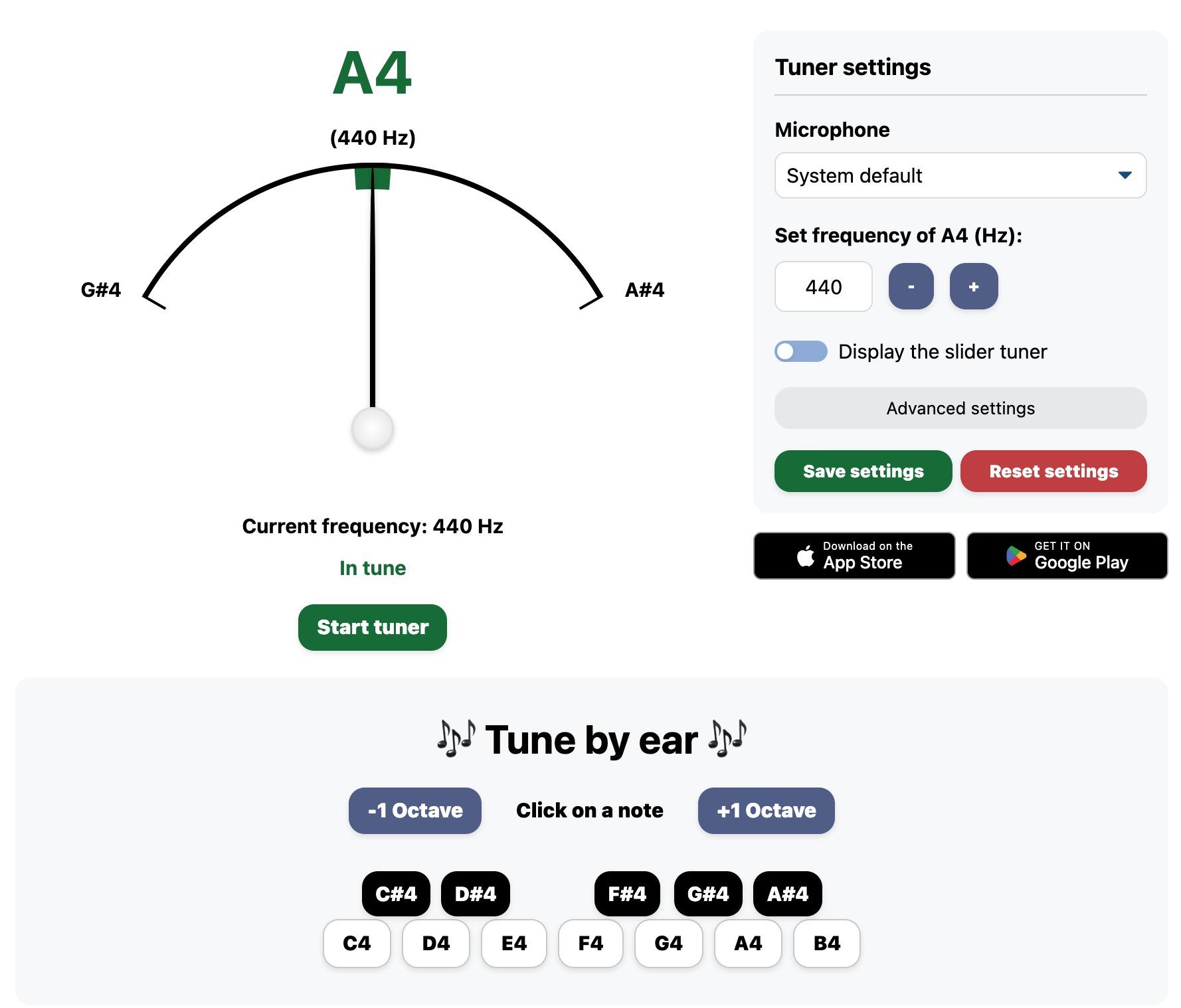
Right below the microphone selector sits one of the features musicians miss most in Google’s widget: live A4 concert pitch calibration. With a single click on the minus or plus buttons—or by typing an exact number—you can shift the reference pitch away from 440 Hz to match a grand piano, a European symphony orchestra, or a historical ensemble. If you prefer dedicated pages for specific standards, we also maintain ready-to-use tuners for 432 Hz, 440 Hz, 442 Hz, and 444 Hz.
For players who dislike curved needles, a single toggle switches the display into a clean linear slider tuner. Opening Advanced settings unlocks two studio-grade controls that make a dramatic difference outside silent rooms: a configurable noise gate that ignores ambient hum below your chosen volume floor, and a precision slider that balances responsiveness against rock-steady note locking. Once everything feels dialed in for your instrument and room, clicking Save settings stores those preferences locally so they are waiting for you next time—no account required.
Tuning by Ear When Microphones Struggle
Even the finest microphone algorithm struggles in a loud rehearsal space, a windy park, or a shared apartment late at night when you cannot pluck loudly enough to cut through room noise. Because Google Tuner relies exclusively on microphone input, it becomes completely unusable the moment your mic cannot get a clean signal.
Directly beneath the dial on OnlineTuner.org, the built-in Tune by ear keyboard lets you play clean, sustained reference notes across multiple octaves with a single click. Hearing the target pitch out loud lets you match your strings by ear, hear the slow acoustic "beats" disappear as two notes lock into unison, and gradually build genuine pitch recognition. When you need finer frequency control or want to check an exact harmonic, you can also jump straight to our Online Tone Generator, our classic Online Tuning Fork, or our real-time Online Pitch Detector.
Dedicated Layouts for Guitar, Ukulele, Bass, Violin & Alternate Tunings
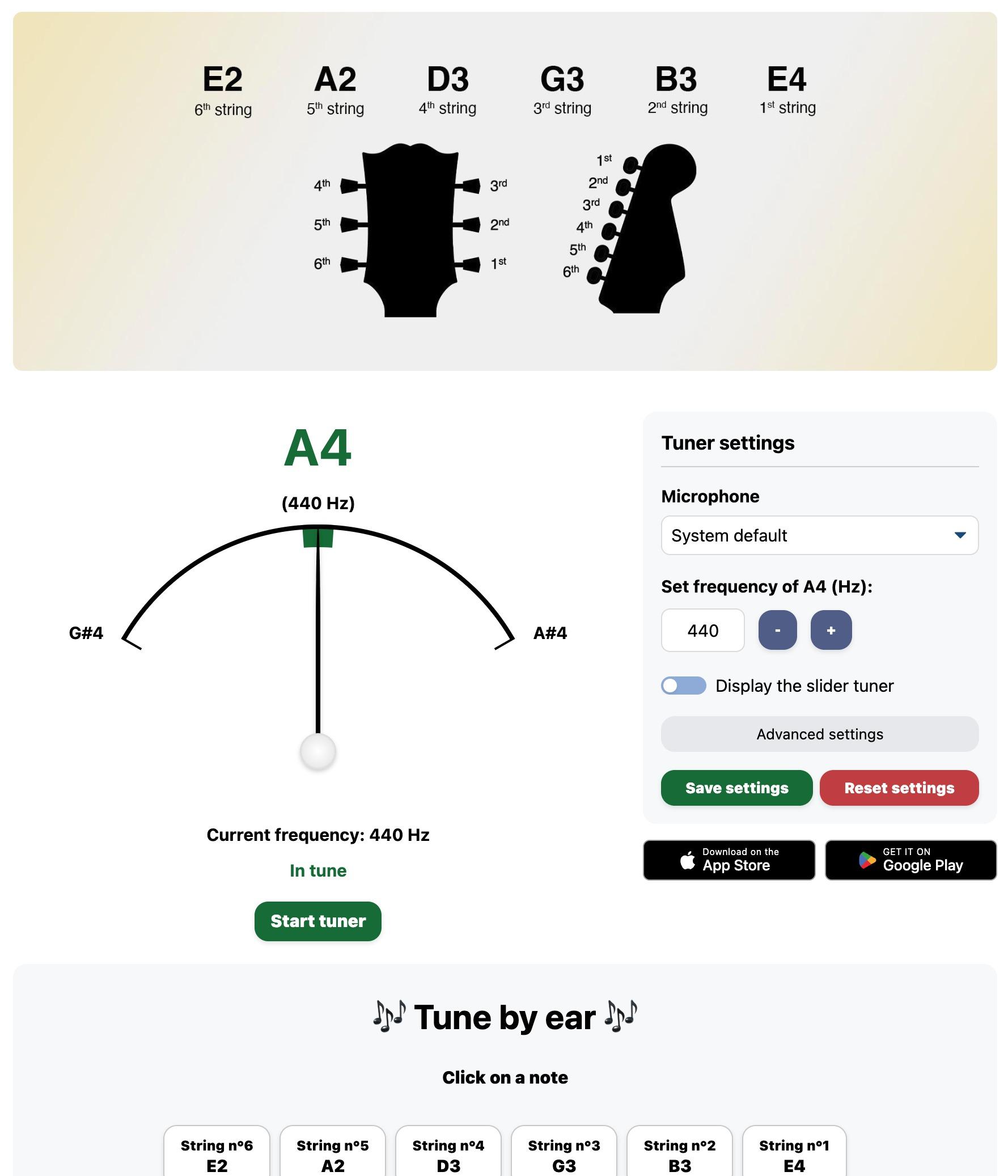
Where a generic search widget leaves beginners guessing which peg turns which string, dedicated instrument pages remove every ounce of friction. On our Online Guitar Tuner, a clear visual guide maps every string from the 6th (E2) to the 1st (E4) across both classic 3+3 acoustic headstocks and 6-in-line electric headstocks, paired with six clickable string buttons at the bottom so you can listen to each open string whenever you want a reference.
The real magic shows up the day you venture beyond standard EADGBE. Instead of hunting through charts to remember which strings drop by a whole step, you can open dedicated pages already configured for Drop D, Drop C, DADGAD, Open G, Open D, or Half-Step Down. The exact same care extends across the rest of the studio: Ukulele (including Low-G and Baritone), Bass (standard, Drop D, Drop C, and BEAD), Violin, Banjo, Cello, Viola, Mandolin, and Trumpet.
Why Google Tuner Sometimes Refuses to Load or Hear You
A surprising number of players end up searching for an alternative simply because Google’s widget vanishes or stops responding. Because it is a search feature rather than a standalone web application, Google only renders it for specific combinations of language, region, and browser. Search in a different locale, open a private tab, or switch from Chrome to Safari or Firefox, and the interactive tuner often disappears altogether.
Microphone permissions create a second common trap. On iOS Safari and privacy-hardened desktop browsers, granting mic access inside a dynamic search results page frequently fails silently or resets the moment you navigate away. A dedicated site like OnlineTuner.org requests a clean, standard browser permission tied to one permanent domain, works across desktop and mobile browsers alike, includes a glare-free dark theme for dim stages, and can even be installed as a standalone web app or opened through our native iOS and Android apps.
Google Tuner vs. OnlineTuner.org at a Glance
| Feature | Google Tuner | OnlineTuner.org |
|---|---|---|
| Chromatic microphone detection | Basic meter only | Needle & linear slider modes with real-time Hz display |
| Microphone & interface selector | No (default device only) | Yes — switch between built-in mic, USB mic, or audio interface |
| Noise gate & precision controls | No | Yes — adjustable noise floor & pitch sensitivity |
| Instrument diagrams & string presets | No | Guitar, Bass, Ukulele, Violin, Banjo, Cello, Viola, Mandolin & Trumpet |
| Alternate & drop tunings | No | Drop D, Drop C, DADGAD, Open G, Open D, Half-Step Down, Low-G & more |
| Play-by-ear reference audio | No | Built-in octave keyboard, string buttons, Tone Generator & Tuning Fork |
| Custom A4 calibration | Locked to 440 Hz | Free Hz control plus 432, 440, 442 & 444 Hz presets |
| Dark theme, saved settings & mobile apps | No | Yes — one-click dark mode, saved preferences & iOS/Android apps |
Making the Switch in Your Daily Practice
Google’s search widget will always be a neat trick in a pinch, yet tuning is the very first habit of every good rehearsal. Giving yourself a calmer, steadier, and better-equipped tool takes no more effort than bookmarking your favorite instrument page on OnlineTuner.org—or saving it directly to your home screen so it launches in one tap before you even pick up your instrument.
If you want to build your ear alongside your tuner, explore our step-by-step Tuning Tutorials for guitar, ukulele, bass, and violin. And once every string rings true, keep your rhythm locked in with our free companion Online Metronome.


