
One Step Down Ukulele Tuner
Tuner settings


🎶 Tune by ear 🎶
If you're looking to tune your ukulele 🎶, you've come to the right place on the internet! Our one step down ukulele tuner provided by OnlineTuner.org allows you to tune your ukulele effortlessly, straight from your web browser. Just click on the “Start tuner” button on the one step down ukulele tuner below and pluck your ukulele's strings one by one. Our tuner will guide you through the process and tell you whether your strings need to be tuned up or down. Additionally, you can hear all the notes corresponding to your ukulele strings - a one step down ukulele tuning (FA#DG) - on our tuner synthesizer, so that you can tune your ukulele by ear. More information on how to tune your ukulele with this online tuner and more ukulele tuning variations are available below. Enjoy your tuning experience!
How to use our one step down ukulele tuner?
To accurately tune your ukulele using OnlineTuner.org's one step down ukulele tuner, start by scrolling down to our one step down ukulele tuner. Then, proceed with these steps:
- Ensure you're in a quiet environment to make sure you get the most precise tuning possible. Position yourself and your ukulele in front of the device you're using to access our one step down ukulele tuner.
- Once you're on the tuner page, click the "Start Tuner" button and allow OnlineTuner.org to use your device's microphone.
- Activate the tuner and pluck each string of your ukulele individually. Watch the indications on the tuner; it will show the closest note to the one you're playing and indicate if the string needs to be tuned higher ("tune up") or lower ("tune down").
- Tune your ukulele's pegs while checking the online tuner's display until it confirms each string is perfectly in tune. Note that the note above the tuner meter will turn green when you've hit the right pitch.
Our one step down ukulele tuner is equipped with precise technology and an easy-to-use interface to streamline your tuning.
How do I tune up/down a ukulele string?
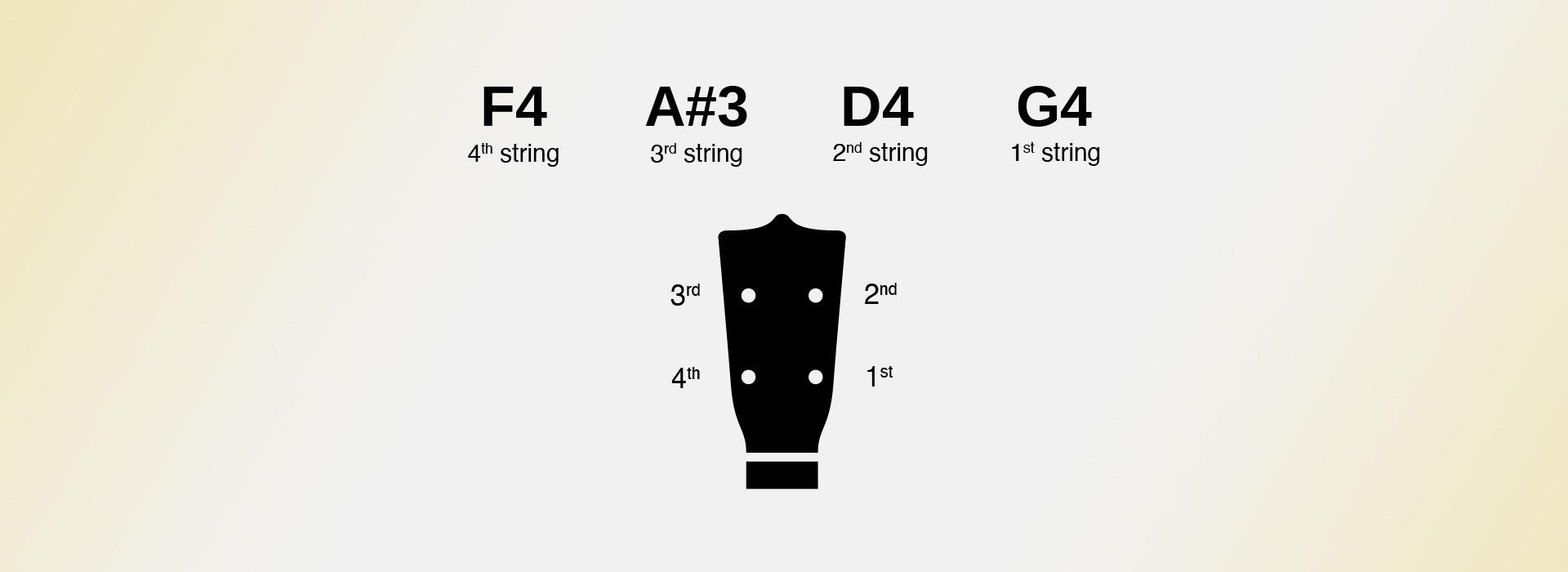
To tune a string of a Ukulele, identify the corresponding tuning peg on your ukulele. You may refer to our picture above. Pluck the string, then hold the peg and turn it to alter its pitch. If the tuner suggests tuning up for a higher pitch, turn the peg counter-clockwise. If it needs to be lower, turn it clockwise. Proceed carefully, adjusting in small increments and frequently checking the tuner to avoid over-tuning and potentially snapping the string. Always use a reliable tuner, like our one step down ukulele tuner on OnlineTuner.org, to verify that you have reached the precise pitch before moving on to the next string.
What are the 4 strings of a one step down ukulele tuning?
A ukulele tuned one step down has four strings. They follow the standard ukulele tuning exactly, except that every string is lowered by a whole tone - two semitones. As with standard tuning, the 4th string remains higher in pitch than the 3rd.
F4 - 4th string: This is the top string when you hold the ukulele and is tuned to F4, with a frequency of about 349.23 Hz.
A#3 - 3rd string (lowest in pitch): This string is tuned to A#3, also written Bb3, with a frequency of about 233.08 Hz.
D4 - 2nd string: This string is tuned to D4, with a frequency of about 293.66 Hz.
G4 - 1st string: This is the bottom string when you hold the ukulele and is tuned to G4, with a frequency of about 392.00 Hz.
Dropping a full tone loosens the strings noticeably more than a half step does, so the instrument feels softer under the fingers and sounds rounder. Players use it to bring a song into a comfortable vocal range, and to take some strain off older or more fragile instruments.
Understand our one step down ukulele tuner's settings
The present one step down ukulele tuner, provided to you by OnlineTuner.org, is designed to suit novice as well as experimented musician's needs. It offers an accurate, robust and versatile ukulele tuning experience that can be customized to a user's specific requirements. You can access each of these settings directly on our one step down ukulele tuner, or by clicking on “Advanced settings”.
Adjust the A4 frequency of our one step down ukulele tuner
One of the most crucial settings to consider when using our one step down ukulele tuner is the adjustable frequency of the A4 note. This setting serves as the foundational pitch from which all other notes are calculated. While the default is often set to the international standard of A=440 Hz, many musicians have strong preferences for alternative frequencies such as A=432 Hz or A=442 Hz. The ability to adjust this foundational pitch makes our one step down ukulele tuner flexible enough to accommodate musicians who play in various tuning systems, whether they be historical temperaments - a lower A4 frequency was more popular in the past - or modern experimental tunings.
Set the sensitivity of our one step down ukulele tuner
Another important feature of our one step down ukulele tuner is the sensitivity settings, which can be altered to suit the specific environment or instrument in use. You can play with the detection algorithm's probability threshold. By adjusting this, users can control how many notes the tuner will detect and how accurately it will do so. Slack strings ring with a slightly weaker fundamental, so raising the threshold a little keeps the tuner locked on the note you are actually playing.
Using our one step down ukulele tuner in challenging environments
Further, the noise gate setting of our one step down ukulele tuner stands as a strong ally for those tuning in acoustically challenging environments. Whether you're in a room with an air conditioner humming in the background or in a rehearsal space with other musicians, the noise gate allows you to set a volume threshold below which sounds will be ignored by our one step down ukulele tuner. This ensures that only the sound of your ukulele is picked up and analyzed, increasing the tuner's accuracy.
Meter tuner vs Slider tuner
This last setting is just a matter of taste, but you can choose whether you prefer to use our Meter tuner or rather our Slider tuner. To alternate between one and the other, just click on the "Display the slider tuner" switch of our one step down ukulele tuner.

All our online ukulele tuners
Different songs call for different tunings. Below you will find every free online tuner we offer for this instrument, from standard tuning to alternative options such as drop, open and half-step tunings. Each tuner runs directly in your browser and listens through your microphone. There is nothing to install and nothing to pay. Choose the tuning you need and start playing in seconds.


