
Drop A Bass Tuner
Tuner settings


🎶 Tune by ear 🎶
If you’re trying to tune your bass to Drop A 🎸, you’ve come to the right place on the internet. Our Drop A Bass Tuner, provided to you by OnlineTuner.org, allows you to tune your bass to Drop A with ease, directly from your web browser. Just click on the “Start tuner” button on the Drop A Bass Tuner below and pluck the strings of your bass. Our Drop A Bass Tuner will handle the rest and guide you on whether you need to tune up or down your strings to achieve the correct bass tuning. You can also play all the notes corresponding to your bass strings on our tuner synthesizer to familiarize yourself with the sound, enabling you to fine-tune your bass by ear. Below, you’ll find detailed instructions on how to use our Drop A Bass Tuner, along with the string gauges and setup changes this tuning asks for. We wish you an accurate and enjoyable tuning experience!
How to use our Drop A Bass Tuner?
To effectively tune your bass to Drop A using OnlineTuner.org’s Drop A Bass Tuner, follow these simple steps:
- Ensure that you are in a quiet environment to enable precise tuning. Also, position yourself and your instrument in front of the device from which you’re accessing our Drop A Bass Tuner.
- Once you’ve accessed the tuner, click the “Start Tuner” button, and allow the website to access your computer or device’s internal microphone.
- With the Drop A Bass Tuner activated, pluck each string on your bass one at a time. Observe the tuner’s digital display; it will show the closest note to the one you’re playing and provide guidance on whether the string needs to be tightened (“tune up”) or loosened (“tune down”) to achieve the correct bass tuning.
- Adjust the tuning pegs of your bass as needed, and retest each string until the tuner confirms that every string of your bass is perfectly in tune.
Our Drop A Bass Tuner combines high-precision technology and user-friendly interface features to make your bass tuning experience straightforward and accurate.
How do I tune up/down a bass string?
Following the indications provided by our Drop A Bass Tuner involves adjusting your bass’s tuning pegs to achieve the correct bass tuning. To adjust a string either up or down to attain the correct tuning, identify the peg associated with the string you wish to tune. Grasp the peg firmly and turn it while plucking the corresponding string to adjust its pitch. If our Drop A Bass Tuner indicates that the string needs to be tuned up to a higher pitch, turn the peg counterclockwise to tighten it. Conversely, if the string must be lowered in pitch, turn the peg clockwise to loosen the string. Remember to make these adjustments gradually and cautiously to avoid overshooting the desired note and potentially damaging your strings. Always use a reliable tuner, like our Drop A Bass Tuner on OnlineTuner.org, to ensure precise tuning before moving on to the next string.
Why tune your bass to Drop A?
Drop A on a four-string bass is BEAD with the lowest string taken down one more whole step, from B0 to A0. That A0 is the lowest note on a grand piano, at 27.50 Hz — close to the bottom edge of what most people hear as pitch rather than feel as vibration.
The appeal is the same as any drop tuning: the lowest string sits a perfect fifth below the next one, so a power chord falls under a single finger, and heavy riffs can be played fast without awkward stretches. It also lets a bassist match a guitarist playing in Drop A without transposing. Be aware that the top three strings stay in standard relative tuning, so patterns on those strings are unchanged, while the lowest string no longer follows the fourths pattern.
What are the frequencies of the 4 strings on a bass tuned to Drop A?
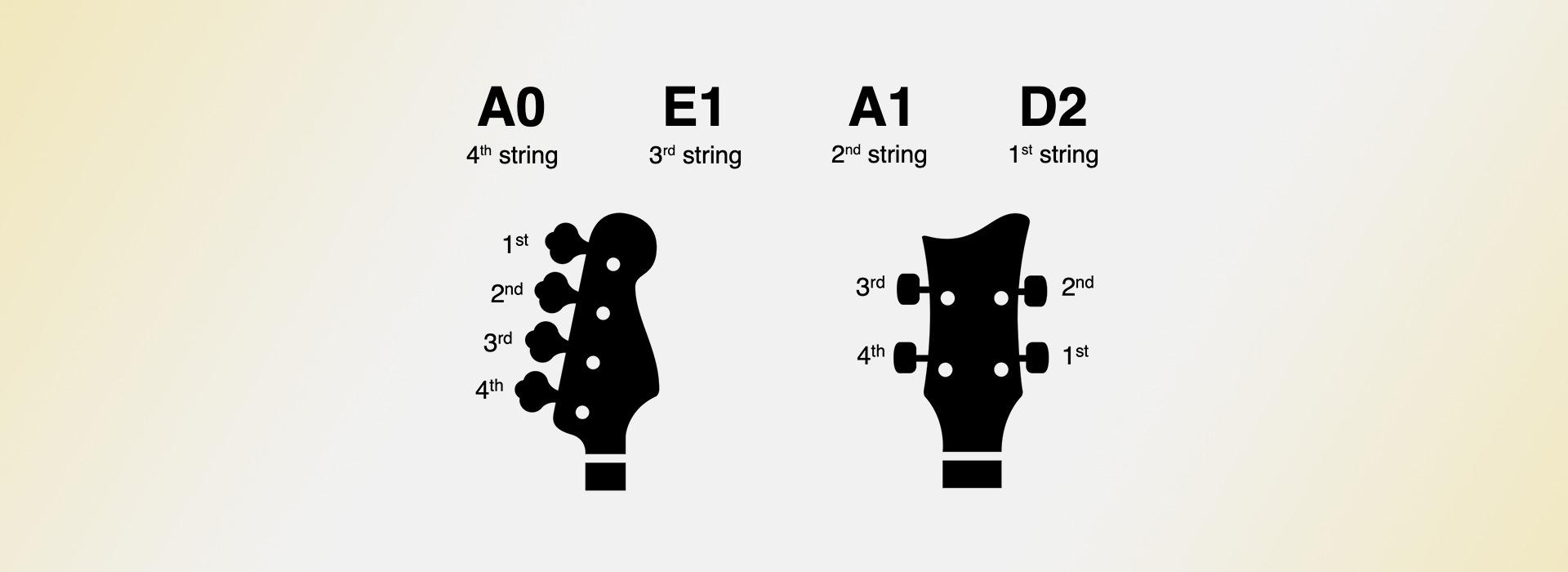
On a four-string bass tuned to Drop A, the strings are tuned as follows (for A4=440 Hz):
A0 - 4th string (lowest): This is the thickest string and plays the lowest note on your bass. In Drop A tuning, it’s tuned to A0, and its frequency is approximately 27.50 Hz.
E1 - 3rd string: This string is tuned to E1, and its frequency is approximately 41.20 Hz.
A1 - 2nd string: This string is tuned to A1, and its frequency is approximately 55.00 Hz.
D2 - 1st string (highest): This is the thinnest string and plays the highest note on a four-string bass. In Drop A tuning, it’s tuned to D2, and its frequency is approximately 73.42 Hz.
Accurately tuning your bass is essential for producing a deep and resonant sound. Our Drop A Bass Tuner is designed to make this process easy and efficient.
Strings and setup for Drop A tuning
This is the most demanding tuning on this page, and the one most likely to disappoint on an unmodified bass. At A0 a standard-scale 34-inch neck leaves the string very slack, which produces a loose, pitch-vague note that a tuner struggles to read and an amplifier struggles to reproduce.
Two things help. First, gauge: a .135 or heavier low string is a realistic minimum, and purpose-made Drop A sets go further. Second, scale length — a 35-inch or longer extended-scale bass holds A0 far better than a 34-inch one, which is why many players who live in this tuning use one. Expect to widen the nut slot, raise the action slightly to stop the low string choking, and re-intonate. If the note still sounds indistinct, adding a high-pass filter around 30 Hz on your amp often makes it clearer, not thinner.
Tuning a bass to Drop A using octave harmonics
Tuning a bass or other low-frequency instruments using a digital or an online instrument tuner can be tricky. The reason is that algorithms detecting frequencies are more accurate the higher the note. This matters especially here, because A0 is a very low fundamental. You might want to try tuning your bass using octave harmonics. Such method involves using the natural resonating frequencies of the string at points that divide it into segments vibrating in equal proportions. To utilize octave harmonics for tuning your bass to Drop A, we’ll focus on those found at the 12th fret, which produce a pitch one octave above the open string.
Here’s the step-by-step process:
Tune the A String (4th) of your bass:
- Activate the octave harmonic by lightly touching the A string at the 12th fret—right over the fret bar—without pressing the string down to the fretboard.
- Pluck the string and then quickly remove your touching hand to let the octave harmonic ring clearly.
- Use an online tuner like OnlineTuner.org to provide the reference pitch. Adjust the tuning peg for the A string until the pitch of the harmonic matches the tuner’s indication for an A one octave above the open string - an A1.
Tune the E String (3rd) of your bass:
- Repeat the process by creating the octave harmonic on the E string at the 12th fret.
- Tune the E string until the harmonic matches the pitch E one octave above the open E string as indicated by the online tuner - an E2.
Tune the A String (2nd) of your bass:
- Repeat the process by creating the octave harmonic on the A string at the 12th fret.
- Tune the A string until the harmonic matches the pitch A one octave above the open A string as indicated by the online tuner - an A2.
Tune the D String (1st) of your bass:
- Repeat the process by creating the octave harmonic on the D string at the 12th fret.
- Tune the D string until the harmonic matches the pitch D one octave above the open D string as indicated by the online tuner - a D3.
Using octave harmonics to tune is advantageous because these harmonics are clearer and more defined than those produced at other points along the string, making it easier to discern when the pitch is perfectly in tune. The octave harmonic represents the fundamental note of the string more accurately, which is particularly beneficial when working with the lower frequencies of a bass, especially when it’s tuned to Drop A. Additionally, when using an online tuner like OnlineTuner.org, you have the advantage of visual feedback to aid in fine-tuning each string to the correct pitch, which can be especially useful in noisy environments where aural tuning might be challenging.
Understand our Drop A Bass Tuner’s settings
The Drop A Bass Tuner provided by OnlineTuner.org is designed to cater to both novice and experienced musicians when tuning their bass. It offers an accurate, robust, and versatile tuning experience that can be customized to meet your specific needs. Access each of these settings directly on our Drop A Bass Tuner or click on “Advanced settings” for more options.
Set the A4 value of our Drop A Bass Tuner
One of the most crucial settings when using our Drop A Bass Tuner is the adjustable frequency of the A4 note. This setting serves as the foundational pitch for all other notes. While the default is often set to the international standard of A=440 Hz, some musicians prefer alternative frequencies such as A=432 Hz or A=442 Hz. Adjusting this foundational pitch makes our Drop A Bass Tuner flexible enough to accommodate musicians who play in various tuning systems, whether they be historical temperaments or modern experimental tunings.
Adjust the sensitivity of our Drop A Bass Tuner
Another essential feature of our Drop A Bass Tuner is the sensitivity settings, which can be customized to suit the specific environment or instrument in use when tuning your bass. Adjust the algorithm’s probability threshold to control how many notes the tuner detects and its accuracy. This setting is especially useful for musicians who require precise tuning or use specific sound effects on their bass while playing, and it can help our Drop A Bass Tuner lock onto a very low fundamental such as A0.
Using our Drop A Bass Tuner in challenging environments
Additionally, the noise gate setting of our Drop A Bass Tuner is beneficial for tuning in acoustically challenging environments. Whether you’re in a room with background noise or in a rehearsal space with other musicians, the noise gate allows you to set a threshold below which sounds will be ignored by our Drop A Bass Tuner, ensuring that only your bass’s sound is picked up and analyzed, enhancing the tuner’s accuracy.
Meter tuner vs. Slider tuner
Finally, you can choose between our Meter tuner and Slider tuner based on your preference when tuning your bass. Switch between them by clicking on the “Display the slider tuner” switch of our Drop A Bass Tuner.

All our online bass tuners
Different songs call for different tunings. Below you will find every free online tuner we offer for this instrument, from standard tuning to alternative options such as drop, open and half-step tunings. Each tuner runs directly in your browser and listens through your microphone. There is nothing to install and nothing to pay. Choose the tuning you need and start playing in seconds.


