
Nashville Tuning Guitar Tuner
Tuner settings


🎶 Tune by ear 🎶
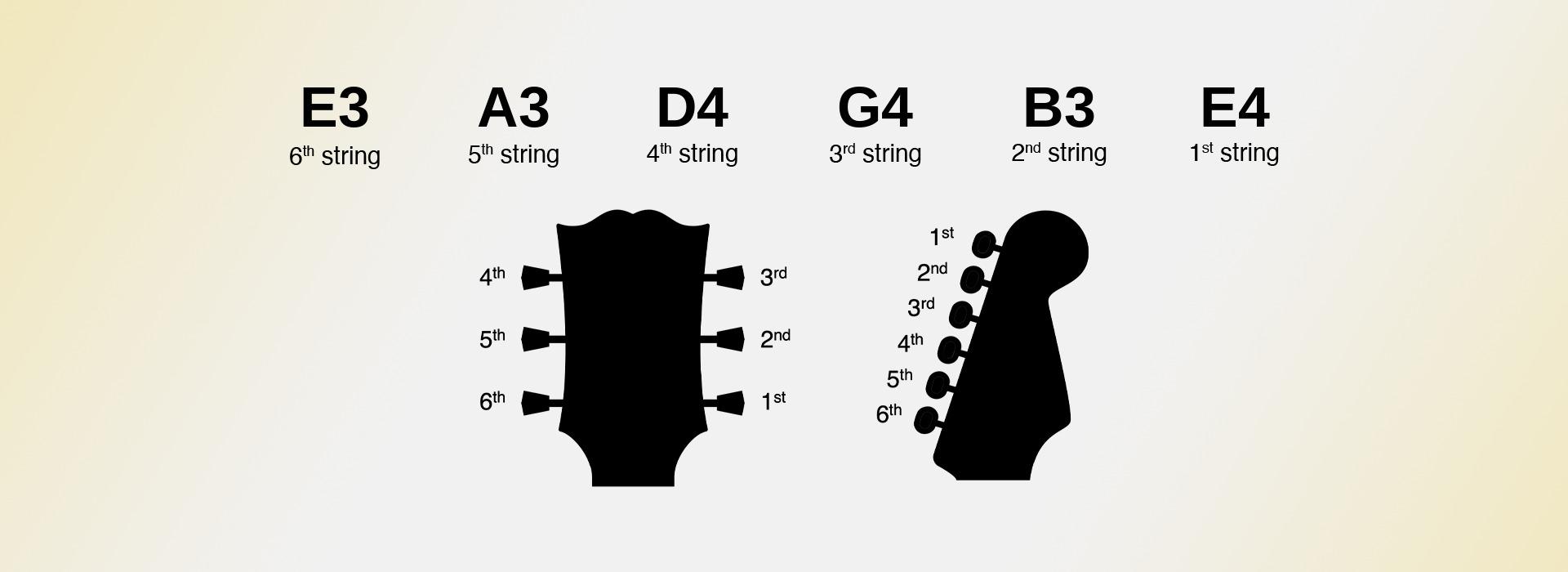
Nashville tuning — also called high-strung tuning — keeps the note names of standard tuning but raises the bottom four strings by an octave. The 2nd and 1st strings stay exactly where they are, which means the guitar is no longer tuned low to high: the 3rd string, at G4, is the highest-sounding string on the instrument.
That deliberate reordering is the point. It reproduces the thin octave strings of a 12-string set without the six lower strings underneath, so the guitar rings and shimmers rather than filling the low end. Click here to open the tuner and follow the steps below.
Strings and Frequencies of the Guitar in Nashville Tuning
In Nashville tuning, the guitar strings are tuned to the following notes and frequencies:
- 6th string (E3): 164.81 Hz
- 5th string (A3): 220.00 Hz
- 4th string (D4): 293.66 Hz
- 3rd string (G4): 392.00 Hz
- 2nd string (B3): 246.94 Hz
- 1st string (E4): 329.63 Hz
This is the one tuning on the site that you cannot reach with the strings already on your guitar. Taking a normal 6th string up an octave will break it long before it gets there. You need either a dedicated Nashville or high-strung set, or the four thin octave strings from a 12-string set fitted to the bottom four positions, keeping your usual 2nd and 1st strings.
Tune your Guitar to Nashville
Tuning your guitar to Nashville with OnlineTuner.org is straightforward:
- Ensure you are in a quiet environment and position your guitar near your device’s microphone.
- Click the "Start Tuner" button and allow microphone access when prompted.
- Pluck each string of your guitar one by one, letting the note ring rather than damping it, and the tuner will display the nearest note.
- Use the tuning pegs to adjust each string until it matches the correct note for Nashville.
- Retune and double-check each string, since adjusting one string changes the tension on the others.
Tune the 3rd string to G4 rather than G3 and the 4th to D4 rather than D3 — the tuner is expecting the octave-up targets, so if a string reads an octave low you have almost certainly fitted a standard string in that position.
OnlineTuner.org's Features for Tuning your Guitar More Accurately
OnlineTuner.org offers a number of features that make tuning to Nashville both easy and precise:
- Customizable A4 Frequency: Adjust the reference pitch for A4 from the default 440 Hz to alternatives like 432 Hz or 442 Hz, depending on your preferences.
- Sensitivity Control: Fine-tune the tuner's sensitivity so it picks up only the sound of your guitar, even in noisy environments.
- Noise Gate: Set a volume threshold to filter out background noise and improve accuracy.
- Save Settings: Keep your preferred sensitivity and reference pitch for future tuning sessions.
- Visual Tuning Interface: Choose between a meter or a slider display, depending on your personal preference.
History of Nashville Tuning for the Guitar
Nashville tuning is a studio invention, named after the session players who developed it in the 1960s and 70s. Faced with producers who wanted the sparkle of a 12-string but the clarity of a six, engineers began stringing a spare guitar with the octave half of a 12-string set and layering it against a normally tuned track.
The technique stayed largely inside professional studios for years because it required sacrificing a guitar to it — you cannot switch back mid-session. It reached a wider audience through records where the effect is unmistakable, including the Rolling Stones' "Wild Horses" and Pink Floyd's "Hey You", and dedicated high-strung string sets are now sold for it.
Usage of Nashville Tuning
Nashville tuning is used almost entirely as a layering tool. Record a part in standard tuning, then double it note for note on a high-strung guitar, and the two together sound convincingly like a 12-string while staying far easier to mix — you get the octave shimmer without the muddiness a real 12-string adds to the low end.
On its own it is a distinctive sound in its own right: chiming, harp-like and pitched well above where a guitar normally sits, which makes it useful for parts that need to stay clear of a vocal or a piano. Elliott Smith and Keith Richards both used it as a lead texture rather than a doubling trick.
Understand our Nashville guitar tuner's settings
The present Nashville guitar tuner, provided to you by OnlineTuner.org, is designed to suit both novice and experienced musicians' needs. It offers an accurate, robust and versatile tuning experience that can be customized to your specific requirements. You can access each of these settings directly on our Nashville guitar tuner, or by clicking on “Advanced settings”.
Set the A4 value of our Nashville guitar tuner
One of the most crucial settings to consider when using our Nashville guitar tuner is the adjustable frequency of the A4 note. This setting serves as the foundational pitch from which all other notes are calculated. While the default is set to the international standard of A=440 Hz, many musicians have strong preferences for alternative frequencies such as A=432 Hz or A=442 Hz. The ability to adjust this foundational pitch makes our Nashville guitar tuner flexible enough to accommodate musicians who play in various tuning systems, whether historical temperaments or modern experimental tunings.
Set the sensitivity of our Nashville guitar tuner
Another pivotal feature is the sensitivity setting, which can be altered to suit the specific environment or instrument in use. You control it through the detection algorithm's probability threshold, which determines how readily the tuner commits to a note. Nashville tuning puts four strings an octave above where the tuner's users normally expect them, and thin high strings decay fast. A slightly more permissive threshold helps the tuner catch the note before it fades, while picking gently keeps the attack from overloading the microphone.
Using our Nashville guitar tuner in challenging environments
Further, the noise gate setting of our Nashville guitar tuner stands as a strong ally for those tuning in acoustically challenging environments. Whether you are in a room with an air conditioner humming in the background or in a rehearsal space with other musicians, the noise gate lets you set a threshold below which sounds are ignored. This ensures that only the sound of your instrument is picked up and analyzed, increasing the tuner’s accuracy.
Meter tuner vs Slider tuner
This last setting is simply a matter of taste, but you can choose whether you prefer our Meter tuner or our Slider tuner. To alternate between one and the other, just click the "Display the slider tuner" switch on our Nashville guitar tuner.

All our online guitar tuners
Different songs call for different tunings. Below you will find every free online tuner we offer for this instrument, from standard tuning to alternative options such as drop, open and half-step tunings. Each tuner runs directly in your browser and listens through your microphone. There is nothing to install and nothing to pay. Choose the tuning you need and start playing in seconds.


